IRS Schedule F Tax Worksheet for Farmers and Ranchers
Stop dreading tax season. Livestock Runner automatically maps your farm income and expenses to IRS Schedule F line items so you can prepare your taxes with confidence.
Every farmer and rancher who files taxes knows the frustration of IRS Schedule F. Sorting through a year of receipts, categorizing income and expenses into the right line items, and hoping you did not miss a deduction is a time-consuming and stressful process. Livestock Runner eliminates that pain by building your Schedule F worksheet automatically from the transactions you record throughout the year. As you log feed purchases, veterinary bills, animal sales, and every other farm financial activity, the system categorizes each transaction and maps it to the corresponding Schedule F line item. When tax season arrives, your worksheet is already populated and waiting.
Livestock Runner maps your transaction categories directly to IRS Schedule F (Form 1040) line items. Farm income from animal sales flows to Line 2, cooperative distributions to Line 3, agricultural program payments to Line 4, and other farm income to Line 7 in Part I. Farm expenses map to Part II with feed on Line 14, veterinary and medicine on Line 18, insurance on Line 17, supplies on Line 22, and utilities on Line 25 among others. The system covers Lines 2 through 32, including the detailed Other Expenses section on Line 32 for categories that do not fit standard line items. Every mapping follows current IRS guidelines so you can be confident your numbers land in the right places.
The income section of Schedule F can be confusing, especially when you have multiple revenue streams. Livestock Runner breaks it down clearly. Animal sales — whether cattle, goats, dogs, poultry, or any other livestock — automatically populate Line 2. If you receive cooperative distributions, agricultural program payments, or crop insurance proceeds, those flow to their respective lines. Breeding service fees, boarding income, show winnings, and other farm-related revenue are captured under other farm income. The worksheet totals each line automatically, so you can see your complete farm income picture at a glance without manually adding columns of numbers.
Farm expenses are where most producers leave money on the table at tax time. Livestock Runner ensures every deductible expense you recorded during the year appears on the correct Schedule F line. Feed and nutrition costs map to Line 14. Veterinary care and medications go to Line 18. Insurance premiums land on Line 17. Supplies and equipment, housing and facility costs, registration fees, travel expenses, and utilities each map to their designated lines. The system even handles the Other Expenses section on Line 32, where categories that do not fit standard line items are broken out individually with descriptions and amounts. Nothing falls through the cracks because the mapping happens automatically as you record transactions throughout the year.
Tax preparation often requires comparing current year numbers to prior years. Livestock Runner stores your complete transaction history and generates Schedule F worksheets for any calendar year. Select the year you need, and the worksheet instantly populates with that year's income and expenses mapped to the correct line items. This makes it easy to spot trends, verify year-over-year changes, and answer questions from your tax preparer or accountant. If you get audited and need to produce documentation for a prior year, the worksheet and underlying transaction records are ready to go. Having organized, year-by-year tax data is one of the most practical benefits of keeping your farm finances in Livestock Runner.
Livestock Runner's Schedule F worksheet is a preparation tool, not a replacement for professional tax advice. The worksheet organizes your farm financial data into the Schedule F format so you can hand your accountant or tax preparer a clean, complete summary instead of a shoebox full of receipts. Many farmers find that having organized tax data significantly reduces their tax preparation fees because the accountant spends less time sorting and categorizing. The worksheet also helps you have more productive conversations with your tax professional because you can see exactly where your money went and ask informed questions about deductions, depreciation, and tax planning strategies for the coming year.
Not every farm expense fits neatly into a standard Schedule F line item. Livestock Runner handles this gracefully by automatically including any unmapped expense categories in the Other Expenses section on Line 32. If you create a custom category for an unusual expense — say, predator control, specialized testing, or custom processing fees — that category and its total will appear in the Other Expenses detail area with a clear description. You never have to worry about expenses disappearing from your tax worksheet just because they do not match a standard category. The system captures everything so your Schedule F worksheet reflects the complete financial picture of your farm operation.
See It in Action
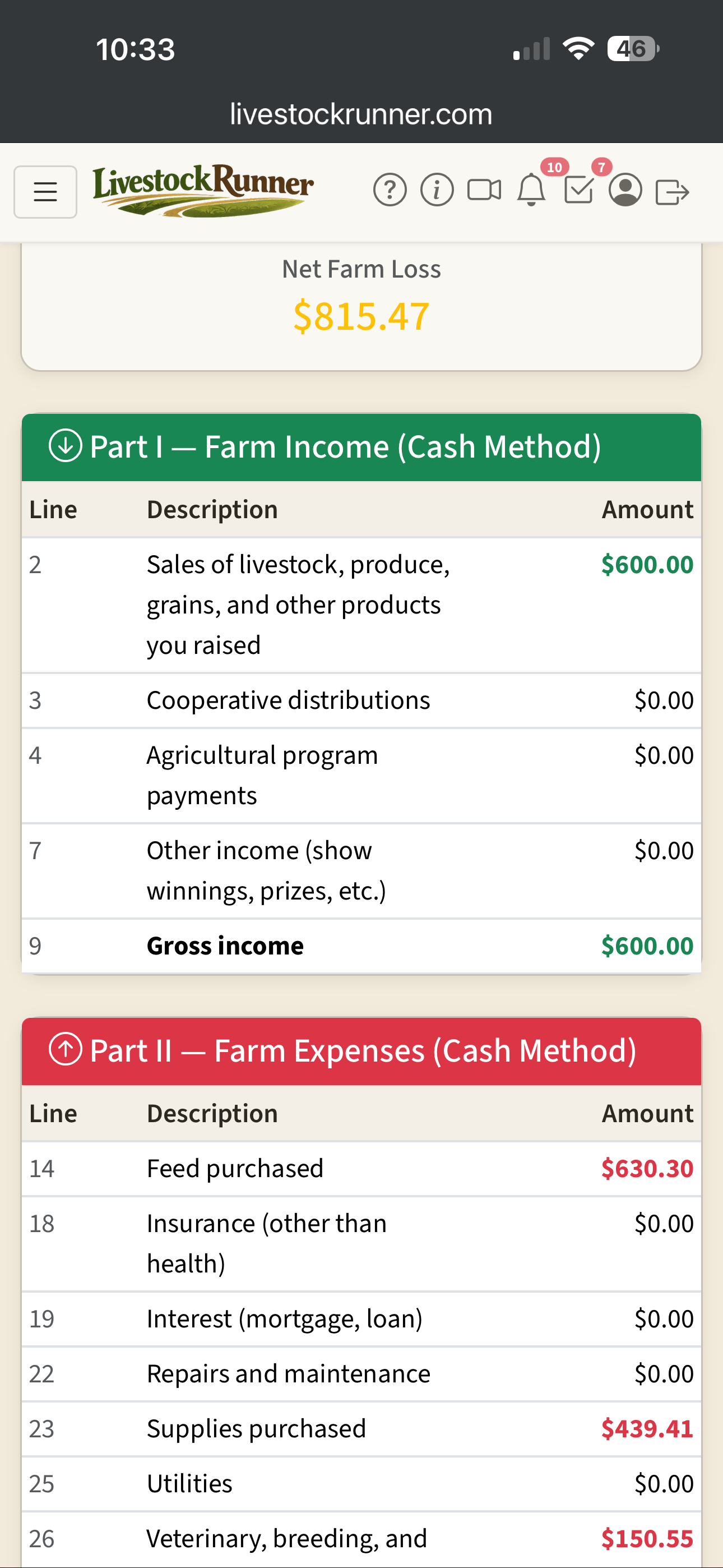
Farm income automatically mapped to Schedule F Part I line items
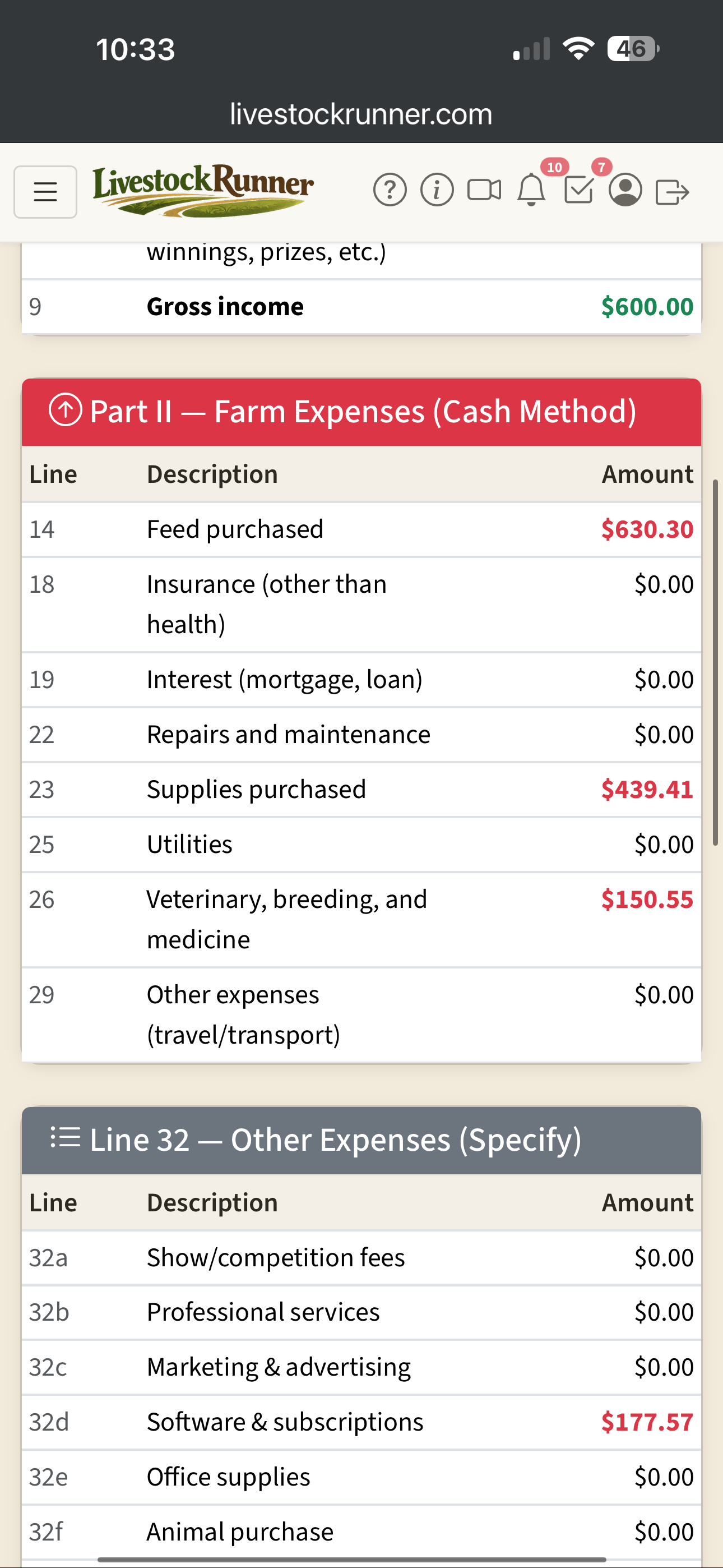
Every farm expense mapped to the correct Schedule F line item
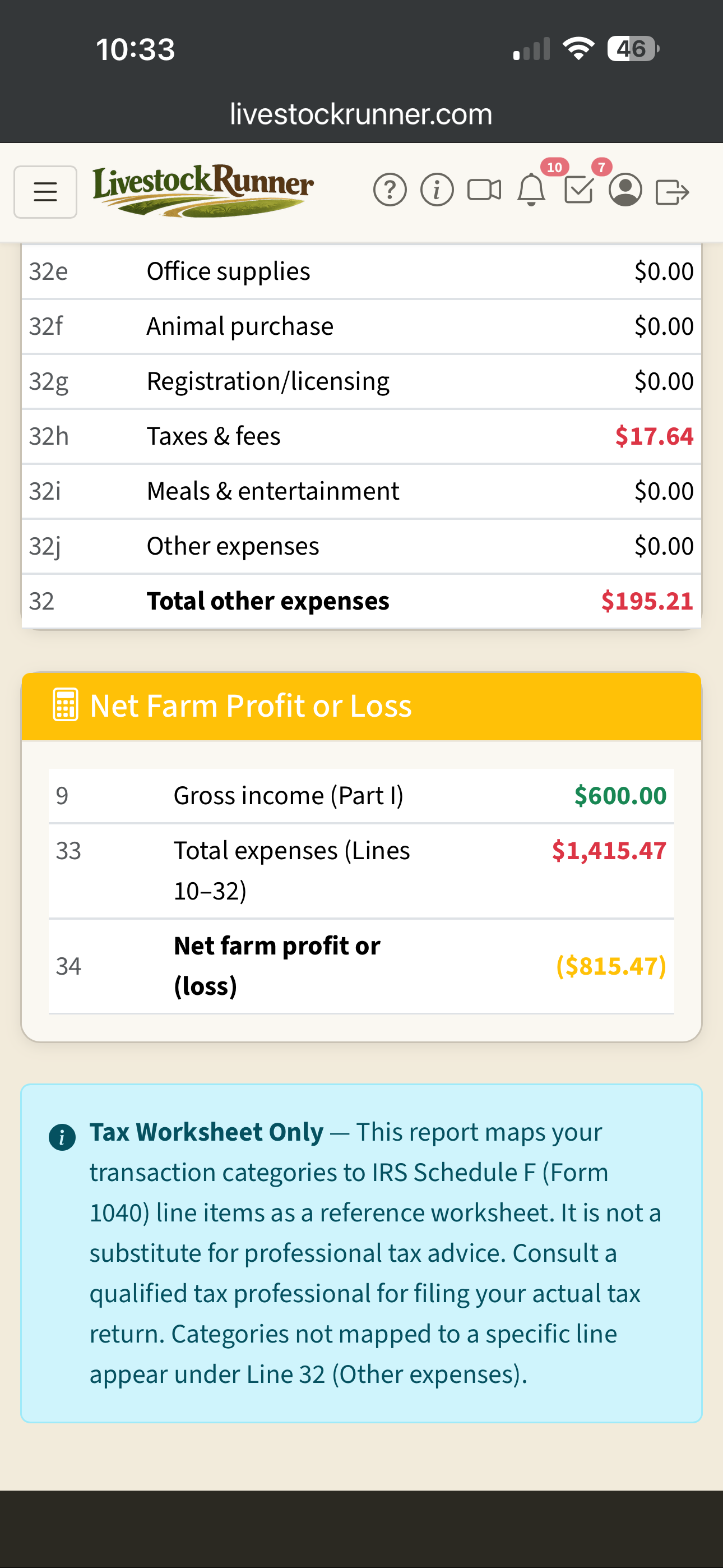
Net farm profit or loss calculated automatically from your data
Related Breed Pages
Simplify Your Farm Tax Preparation
Sign up free and let Livestock Runner organize your farm finances into a Schedule F worksheet automatically.